
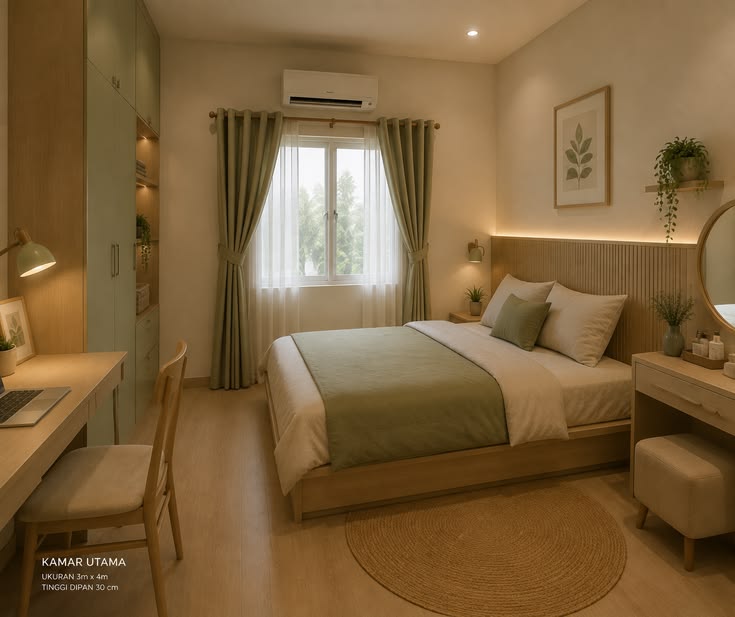
How to Book a Room on Rent in Karnal Haryana Online
Finding and booking a room online can save time, especially if you are moving to Karnal for work, studies, or personal reasons. If you are searching for a Room on Rent in Karnal Haryana Online, you can compare different properties, check facilities, contact the owner or property manager, and arrange a visit before making your final decision.
However, booking a room online should be done carefully. A low rent or attractive photograph is not enough. You should verify the property, understand the rental terms, and confirm exactly what facilities are included.
Why Book a Room on Rent in Karnal Haryana Online?
Online rental platforms make it easier to compare multiple accommodation options without visiting every property.
You can usually check:
- Monthly rent
- Room type
- Furnishing
- Property location
- Available facilities
- Photos
- Parking
- Security
- Contact details
- Rental terms
Current listings in Sector 13, Karnal show different single-room options, including furnished and unfurnished rooms with prices varying according to size and facilities.
Step 1: Decide What Type of Room You Need
Before searching online, decide what kind of accommodation you want.
Common options include:
- Single room
- Shared room
- Furnished room
- Room with attached washroom
- Room with kitchen
- AC room
- Non-AC room
- PG accommodation
- 1 BHK
Knowing your requirements makes online searches much faster.
Step 2: Set Your Monthly Budget
Decide your maximum monthly budget before contacting properties.
Remember to consider more than rent. Your total cost may include:
- Monthly rent
- Electricity
- Water
- Wi-Fi
- Maintenance
- Food
- Parking
- Security deposit
For example, current Sector 13 listings include single rooms around ₹7,000 and ₹8,000, while some fully furnished options are listed at ₹10,000, ₹16,000, or higher.
These are individual listing examples, not a fixed market rate.
Step 3: Search for Rooms Online
You can use property websites, PG directories, Google search, and accommodation websites to find available rooms.
Use specific searches such as:
- Room on Rent in Karnal Haryana
- Single Room Rent in Sector 13 Karnal
- PG in Sector 13 Karnal
- Furnished Room in Karnal
- Room with Kitchen in Karnal
- Room with Attached Washroom in Karnal
The more specific your search, the easier it becomes to find accommodation matching your requirements.
Step 4: Check Photos and Property Details
Don’t rely only on the main property photograph.
Look for information about:
- Room size
- Furniture
- Bed and mattress
- Wardrobe
- Washroom
- Kitchen
- Balcony
- Windows and ventilation
- Parking
- Common areas
If something important is not shown, ask the owner or property manager for additional photos or a video tour.
Step 5: Verify the Location
Location is extremely important when booking a room online.
Check the exact address and distance from:
- Your workplace
- College
- Coaching centre
- Market
- Public transport
- Grocery stores
- Hospitals
- Restaurants
For example, Kunj Niwas is located in Sector 13, near 124 Mughal Canal, Ladla Steels, Chai Sutta Bar, and Sector 13 Market.
Step 6: Check the Facilities
Before booking, make a list of the facilities you actually need.
Basic Facilities
- Bed
- Mattress
- Wardrobe
- Electricity
- Water
- Washroom
- Ventilation
Additional Facilities
- Wi-Fi
- AC
- Kitchen
- Parking
- CCTV
- Security
- Housekeeping
- Power backup
- Balcony
Kunj Niwas lists furnished rooms, selected rooms with kitchens or private washrooms, AC options, Wi-Fi, housekeeping, CCTV, a gated compound, and 24/7 security.
Step 7: Contact the Owner or Property Manager
Once you shortlist a room, contact the property directly.
Ask these questions:
- Is the room currently available?
- What is the monthly rent?
- How much is the security deposit?
- Is electricity included?
- Is Wi-Fi included?
- Is the room furnished?
- Is the washroom attached?
- Is a kitchen available?
- Is parking available?
- What is the notice period?
- Is there a minimum stay?
- Are there additional charges?
Getting these details before booking can prevent misunderstandings later.
Step 8: Request a Video Tour
If you are currently outside Karnal, ask for a live video call or recent room video.
During the video tour, check:
- Actual room size
- Furniture condition
- Washroom
- Kitchen
- Windows
- Natural light
- Common areas
- Entrance
- Parking
- Surrounding location
A live video call is better than relying entirely on old photographs.
Step 9: Visit the Property Before Paying
If possible, visit the property personally before making a large payment.
Check whether the actual property matches the online listing.
Pay attention to:
- Cleanliness
- Noise level
- Security
- Water supply
- Electricity
- Internet
- Room condition
- Neighbourhood
- Access to transport
Step 10: Understand the Rental Agreement
Before moving in, read the rental agreement carefully.
Check:
- Monthly rent
- Security deposit
- Deposit refund conditions
- Notice period
- Lock-in period
- Maintenance charges
- Electricity calculation
- Visitor rules
- Damage responsibility
- Move-out conditions
Don’t sign an agreement if important terms are unclear.
Step 11: Make Payment Safely
Never rush into transferring money simply because someone says the room is in high demand.
Before paying:
- Verify the property
- Verify the owner or manager
- Confirm the room is available
- Understand the refund policy
- Ask for a payment receipt
- Keep copies of important documents and messages
Avoid making large payments to an unverified person without confirming the property.
Can You Book a Room Online Without Visiting?
Yes, you can begin the entire process online, but it is safer to verify the property before making a significant payment.
If you cannot visit personally, consider:
- Live video verification
- Recent property photos
- Location verification
- Direct conversation with management
- Written rental terms
- Payment receipt
For students and professionals relocating to Karnal, this can make the moving process easier while reducing unnecessary travel.
Kunj Niwas: Online Room Enquiry in Karnal
Kunj Niwas offers PG, hostel, and room accommodation in Sector 13, Karnal, for men and women. Its website provides information about different room types, including simple rooms, rooms with kitchens, rooms with washrooms, AC rooms, non-AC rooms, and rooms with balconies.
The website also provides enquiry options and contact information for people interested in checking room availability and facilities.
If you are searching for a Room on Rent in Karnal Haryana Online, you can visit Kunj Niwas to explore the available accommodation options and enquire about your requirements.
Online Room Booking Checklist
Before confirming any rental room, make sure you have checked:
- Exact location
- Monthly rent
- Security deposit
- Furnishing
- Washroom
- Kitchen
- Electricity
- Wi-Fi
- Parking
- Security
- Housekeeping
- Notice period
- Rental agreement
- Payment receipt
Final Thoughts
Booking a Room on Rent in Karnal Haryana Online can be convenient when you use the right process. Start by deciding your budget and room requirements, compare online listings, verify photos and facilities, confirm the location, speak directly with the owner or property manager, and inspect the property before making a major payment whenever possible.
If you are looking for furnished rooms and PG accommodation in Sector 13, Karnal, explore Kunj Niwas to check the available room options and facilities.
Written by: Hiverift
Website: Hiverift
Content & SEO: Hiverift